

They genuinely surface cheaper options, but mainly for flexible travelers open to shifting dates, swapping airports, or letting the tool suggest a destination. Rigid, single-city, fixed-date searches see far less benefit. The next section breaks down exactly how the technology decides what counts as a "deal."
TL;DR:
- AI travel tools mainly benefit flexible travelers who are willing to shift dates, airports, or destinations; fixed-date, single-city searches see limited savings.
- Most AI tools badge deals based on a fare being at least 20% below a 12-month median, but it's essential to verify live prices and coverage before booking.
- Sorting by percent savings and cross-checking the actual dollar amount helps ensure that flagged deals are genuinely advantageous.
- Combining AI flight searches with transparent hotel platforms like HeyVacay maximizes total trip savings, especially when hotel rates are checked after securing flights.
- For group or multi-city trips, current AI tools struggle with handling multiple constraints, but future improvements are expected to address these limitations.
Table of Contents
- How AI Finds Travel Deals
- How to Use AI Tools to Find the Best Travel Deals
- Where AI Travel Tools Fall Short
- How AI Actually Measures a "Deal"
- Comparing AI Travel Deal Tools
- Is Your Data Safe With AI Travel Tools?
- How AI Deals Connect to Booking and Payment
- AI Travel Deals in Action
- Where AI Travel Deal Tools Are Headed
- Why Pairing Flight AI With Smarter Hotel Search Matters
- Lock In Hotel Savings to Match Your Flight Deal
- Sources
- FAQ
How AI Finds Travel Deals
Every AI flight tool works the same basic way: it turns loose language into structured search parameters, then checks that search against a price history to decide if what it found is actually cheap. The mechanics behind that, though, vary enough to matter.
Type "somewhere warm under $400, flexible in March" into a tool like Google's Flight Deals, and natural-language parsing breaks that into destination filters, a price ceiling, and a date range instead of forcing you to fill out a rigid form. Google describes this as a flexible search tool built for travelers whose main goal is saving money, not travelers locked into a specific itinerary.
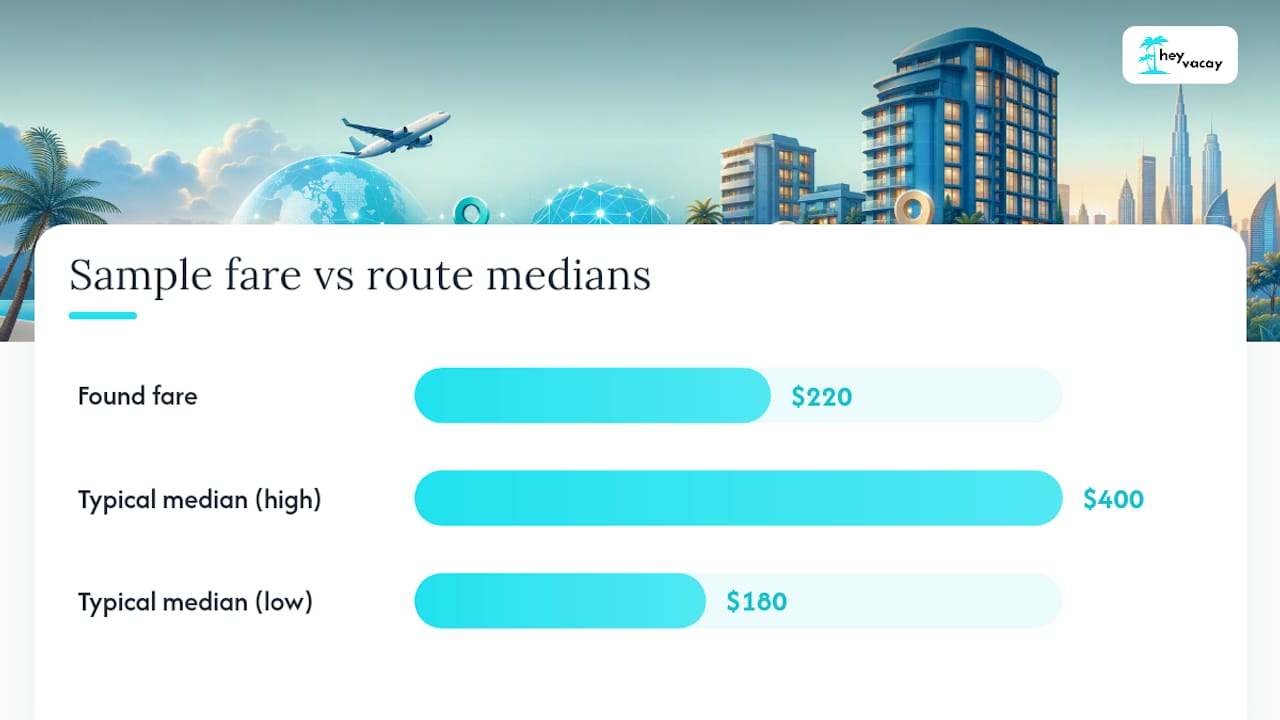
The savings math behind those results usually relies on price history. Google's Flight Deals feature pulls a 12-month median of the cheapest fares on a given route and badges anything roughly 20% or more below that median as a deal. That baseline approach matters because a $220 fare might be a steal on a route that typically runs $400, and a mediocre price on one that typically runs $180.
A few things to check before you trust a badge:
- Whether the price shown is a live, bookable fare or an estimate pending confirmation
- Whether the tool covers your preferred airlines or only partner-network carriers, since coverage gaps between tools are common
- Whether results are sorted by percent savings or absolute price, since these produce different "best deal" rankings
- Whether a flexible-date heatmap or calendar view is available to compare nearby dates at a glance
Those UI signals, savings badges, heatmaps, and ranking toggles are the difference between a tool you can trust at a glance and one that requires manual double-checking every time.
How to Use AI Tools to Find the Best Travel Deals
Getting good results from an AI travel deal finder is less about which app you download and more about how you phrase the request. Here's a workflow that consistently produces better results than typing in fixed dates and hoping.
- Start with a vibe prompt, not a calendar. Try something like "beach trip under $500, flexible the last two weeks of April" or "long weekend somewhere with hiking, direct flight only." Descriptive prompts paired with at least one concrete constraint, budget, trip length, stop count, give the AI enough to translate intent into real search filters without returning results all over the map.
- Turn on flexible dates and nearby airports. This single toggle usually surfaces the biggest savings, since a lot of "deals" only exist because you shifted departure by two days or drove an extra 40 minutes to a secondary airport.
- Sort by percent savings first, then sanity-check the dollar amount. A flight tagged "35% off" that's still $650 may lose to a plain $310 fare with no badge at all.
- Set a price alert and recheck right before booking. Fares move. A deal flagged Tuesday morning can shift by Thursday afternoon.
- Split your research between flights and hotels. Run your flight search first, then bring the trip dates into a hotel tool like HeyVacay to compare total lodging cost, since a cheap flight paired with an overpriced hotel erases most of the savings.
Pro Tip: Add one hard constraint to every vibe prompt, a nightly budget, a max number of stops, a trip length. Vague prompts return vague, overly broad results; specific prompts return bookable ones.
Where AI Travel Tools Fall Short
AI flight search is genuinely useful, but it has clear edges where it stops working well. Google's own documentation notes that its Flight Deals feature currently does not reliably handle multi-city itineraries, dates far in the future, or large group bookings while the feature remains experimental. If you're booking for eight people or building a three-country itinerary, expect to fall back on manual search for at least part of the trip.
Flagged deals can also vanish. Fare inventory shifts constantly, and investigative reporting on AI travel tools stresses that price volatility is real, so a badge you saw an hour ago isn't a guarantee.
Before you book anything flagged as a deal:
- Confirm the fare is live on the airline or OTA's own site, not just an AI estimate
- Check baggage fees and seat selection costs, which can erase a headline discount
- Read the cancellation policy, especially for basic economy fares
- Note that some AI trip-planning features require you to be signed in and may have limited history or memory during their beta phase
How AI Actually Measures a "Deal"
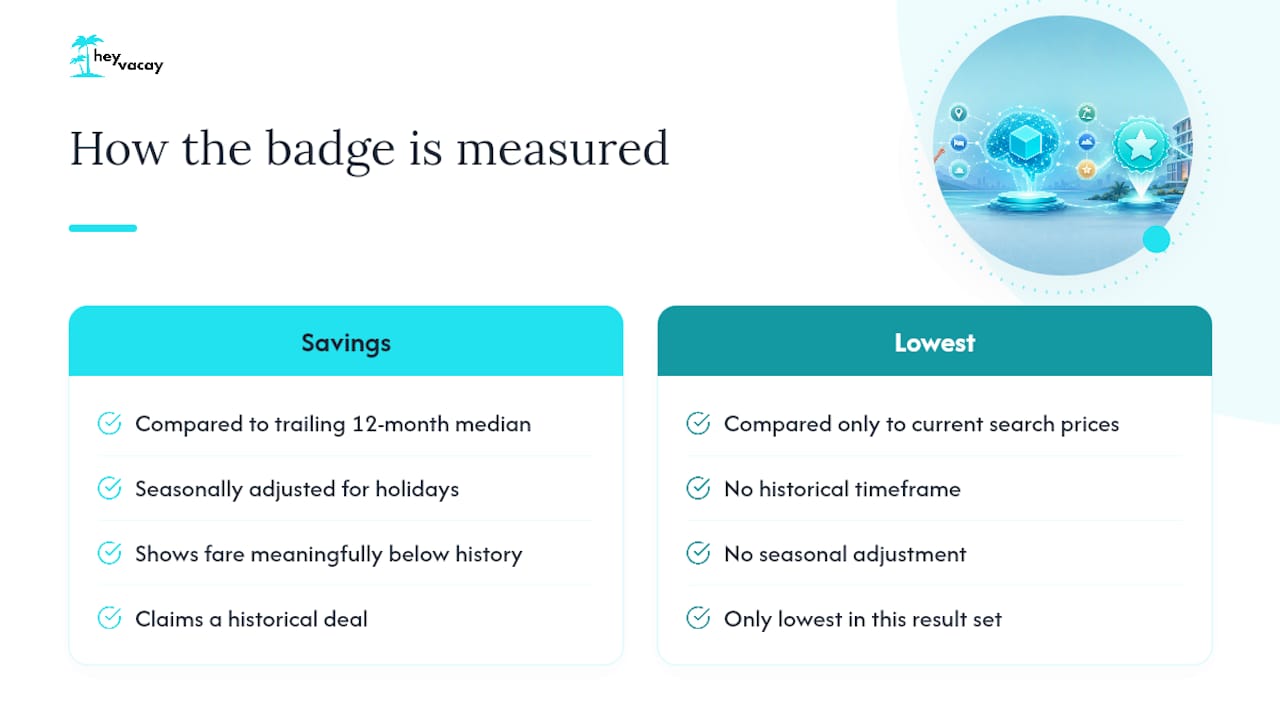
That savings badge you see isn't a marketing flourish, it's a calculation. The most common method compares a fare to the median of the cheapest prices on that route over the trailing 12 months, adjusted for typical seasonal swings so a Thanksgiving fare isn't unfairly compared to a random Tuesday in February.
Tools generally use two different badge types, and confusing them leads to bad decisions. A "savings" badge means the fare sits meaningfully below its historical typical price. A "cheap flights" or "lowest fare" label just means it's the lowest price currently showing in your specific search, which isn't the same claim at all. A route that's expensive by nature can still produce a "lowest fare in this search" result that's a bad deal by any historical measure.
The practical move: compare the percent savings against the actual dollar amount, and rerun your search with filters toggled (nonstop only, different airport, shifted dates) to see if the badge holds up.
Comparing AI Travel Deal Tools
AI-powered flight search tools generally split into two camps: broad search engines that layered AI onto existing fare databases, and newer trip-planner startups built chat-first from day one.
The first camp tends to have deeper fare coverage since it's built on established flight-search infrastructure, with natural-language prompts and flexible-date tools layered on top. Reliability here is usually strong because the underlying inventory has been tested for years, even if the AI layer itself is newer.
The second camp, dedicated AI trip planners, often centers the whole experience around a single chat interface rather than a search form. These tools tend to excel at itinerary building and destination inspiration but can lag on live fare accuracy, since coverage depends heavily on which partner APIs and inventory feeds each startup has integrated. Pricing models vary too: some are free with ad-supported booking referrals, others run subscription tiers for premium itinerary features.
For hotels specifically, HeyVacay takes a more transparent approach: AI-driven price discovery without hidden resort fees or bait-and-switch rates buried at checkout, which matters more once you've already found a decent flight and don't want the hotel to eat your savings.
Is Your Data Safe With AI Travel Tools?
AI trip planners typically need account access to save preferences, remember past searches, and personalize suggestions, which means you're handing over more behavioral data than a basic search engine ever asked for. Read the permissions screen before connecting a Google or email account, since some tools request calendar or contact access they don't strictly need for flight search.
Beta features deserve extra scrutiny. Many AI flight tools require sign-in specifically because they're still experimental, and that sign-in requirement often means your search history and saved trips are stored to improve the model, not just to remember your last query. If a tool doesn't clearly disclose what happens to your data after a session ends, that's worth treating as a red flag rather than an oversight.
Payment information is the bigger concern once you move from searching to booking. Never enter card details directly into a chat-based AI interface, legitimate tools route you to the airline, hotel, or OTA's own secure checkout rather than processing payment inside the chat window itself. If an AI travel tool asks you to pay it directly rather than redirecting you to book with the actual airline or hotel, stop and verify the tool's legitimacy before proceeding.
How AI Deals Connect to Booking and Payment
Finding a deal is only half the transaction. Most AI flight tools don't actually process your payment, they surface the fare, then hand you off to the airline's or OTA's own booking flow to complete the purchase. That handoff point is exactly where you should reverify the price, since the fare that triggered the "deal" badge can shift between discovery and checkout.
Hotel booking generally follows a similar split. A platform like HeyVacay handles the discovery and price comparison, surfacing the same inventory major booking sites carry but at a lower, transparently listed rate, then routes you through a standard secure checkout to finalize payment. That separation between AI-assisted discovery and payment processing is intentional across most of the industry, keeping sensitive card data inside audited, standard checkout systems rather than experimental chat interfaces still in beta.
The practical upshot: treat the AI tool as a research assistant, not a payment processor. Use it to surface the fare or room rate, but always complete the actual transaction on the airline, hotel, or booking platform's dedicated checkout page, where cancellation policies and fee disclosures are clearly spelled out before you enter payment details.
AI Travel Deals in Action
A traveler with loose plans, "a week somewhere in Europe this fall, budget around $600 for flights", gets far more value from an AI tool than someone who needs a specific Tuesday departure from a specific city. Type that vibe prompt into a flexible-search tool, and it can surface multiple destinations simultaneously, ranked by how far below typical price each one falls, rather than forcing a single-route search repeated a dozen times manually.
Business travelers see a narrower benefit. Fixed dates and fixed destinations mean the flexible-search advantage mostly disappears, though fare-alert features still catch legitimate price drops on routes booked repeatedly.
Families planning a multi-room hotel stay hit a different pattern entirely: flight-deal tools optimize the flight leg, but the AI's always-on concierge design means the same chat thread can carry itinerary context, kids' activity ideas, and lodging notes without restarting the search from scratch.
Where AI Travel Deal Tools Are Headed
Expect flexible search to get more precise over the next few product cycles. Current tools already handle "somewhere warm, flexible dates" reasonably well; the next iteration is likely to fold in real-time event data (concerts, sports, festivals) so a prompt like "somewhere with a good food festival in October" returns genuinely relevant destinations instead of generic warm-weather picks.
Multi-city and group booking, the current weak points, will probably improve as the underlying AI models get better at handling multiple constraints simultaneously rather than optimizing a single origin-destination pair. Expect the biggest near-term jump on group travel, since that's a well-defined, high-value gap most tools currently admit to struggling with.
Integration with specialized data feeds is another likely direction. Partners supplying niche, live domain data, similar to how a service like Nausika feeds real-time maritime routing and forecast data into conversational assistants, point toward a future where AI travel tools pull from far more specialized sources than generic fare databases, sharpening accuracy for niche trip types like sailing charters or multi-leg adventure travel.
Why Pairing Flight AI With Smarter Hotel Search Matters
AI flight tools solve half the equation. HeyVacay focuses specifically on the other half: transparent, AI-driven hotel pricing with no hidden fees buried at checkout. A flight deal that saves you $80 doesn't mean much if the hotel search that follows costs you $150 more than it should.
The best total-trip savings come from combining both, not chasing a headline flight discount alone. Run your flight search, then bring those dates into a hotel comparison. For more on getting AI hotel search right, see HeyVacay's breakdown of current AI hotel booking capabilities.
— HeyVacay
Lock In Hotel Savings to Match Your Flight Deal
Found a flight priced 20% below its usual rate? Don't let the hotel erase that win. Some hotel search platforms use AI to surface luxury and budget hotels with clearly disclosed rates and no hidden fees added at checkout.
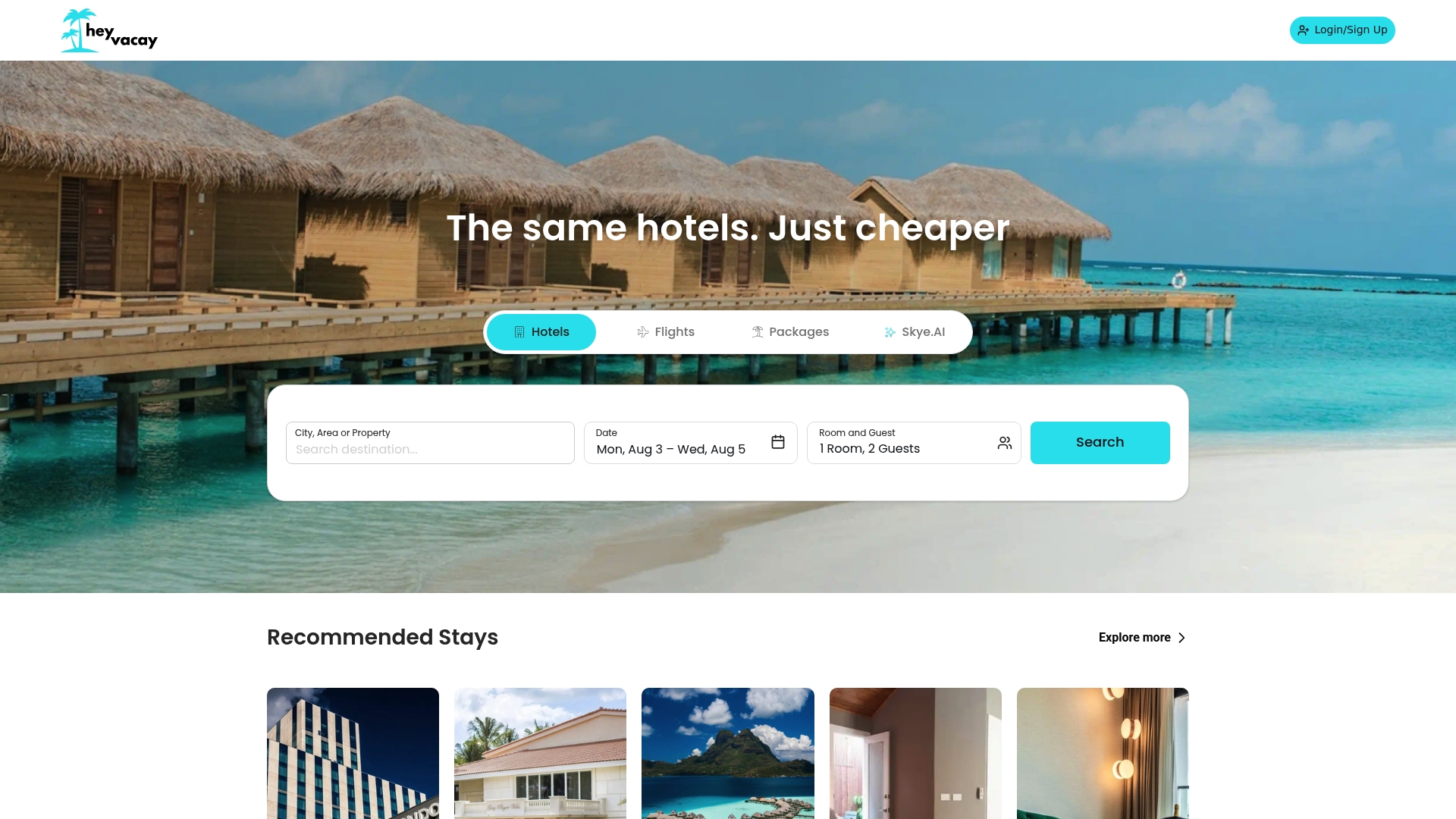
The process is simple: run your flight search with an AI tool like the ones covered above, lock in your travel dates, then bring those same dates to HeyVacay's hotel search to compare total lodging cost across properties. You'll see the price you'll actually pay upfront, not a teaser rate that grows at checkout. If you want more room-by-room tactics for stretching a hotel budget further, HeyVacay's guide to top AI travel apps for hotel search is worth a read before you book. Start by checking your travel dates on an online hotel search platform to see what transparent hotel rates actually look like.
Sources
For readers who want to dig deeper into how the technology works, Google's own Flight Deals support documentation and product announcement detail the savings baseline and feature limits directly. The New York Times' 2026 reporting covers the real-world limits and volatility concerns, and Skift's coverage explains how startup trip planners differ in inventory coverage.
- Find flight deals with AI in Google Flights - Travel Help
- Flight Deals is our new, AI-powered flight search tool
- Can A.I. Get You Where You Want to Go for Less?
- AI trip planner design patterns and always-on concierge functionality
FAQ
What is the best AI for finding travel deals?
There isn't a single best tool for every trip type. Flexible-search features built into established flight search engines tend to have the broadest fare coverage, while dedicated AI trip planners often excel at itinerary building; pairing either with a transparent hotel search like HeyVacay covers both halves of the trip.
Can AI actually get you cheaper flights?
Yes, particularly if you're flexible on dates or airports. AI tools flag fares roughly 20% or more below a 12-month price baseline, but rigid, fixed-date searches see much smaller benefits.
How do I get a 50% discount on flights?
There's no reliable trick that guarantees a 50% discount on demand. The realistic path is stacking flexibility, open dates, nearby airports, off-peak travel, with an AI tool's percent-savings badges, and verifying the fare is live before booking, since price volatility means flagged deals can shift quickly.
What is the best AI for traveling overall?
For full trip planning, look for a tool that combines natural-language search with a single-chat interface that centralizes itinerary building rather than juggling separate apps for flights, hotels, and activities. Combine that with HeyVacay for the hotel leg to keep total costs transparent from search to checkout.