

Six moves solve most large-family hotel headaches: pick the right room type before you fall for a photo, confirm occupancy limits and fees in writing, prioritize suites or connecting rooms over squeezing into a standard double, use a kitchenette or free breakfast to cut food costs, book a refundable rate you can rebook if the price drops, and always call the hotel directly to confirm anything nonstandard. Do these six things and you avoid the two disasters that ruin family trips: arriving to find the room sleeps four, not six, and getting hit with fees that weren't in the quoted price.
Before you book anything, run this checklist:
- Count every sleeper by age, including who can share a bed and who can't.
- Search using "family room," "suite," or "kitchenette" filters, not just "hotel."
- Check the total price, not the nightly rate. Add taxes, resort fees, and extra-person charges.
- Confirm the stated maximum occupancy matches your headcount exactly.
- Book a refundable rate whenever the price difference is small.
- Call the property after booking to confirm bedding, cribs, or connecting-room requests.
Two things to check on any booking page before you pay: the total price including mandatory fees, and the stated max occupancy for the exact room you're selecting.
Key Takeaways
Matching room type and total price, not brand name or nightly rate, determines whether a family hotel booking actually works out.
| Point | Details |
|---|---|
| Filter by room features | Search "suite," "kitchenette," and "family room" instead of generic hotel searches to surface layouts that fit. |
| Compare total cost | Add taxes, resort fees, and extra-person charges before comparing two rooms against one suite. |
| Book early, stay flexible | Reserve 3 months out for peak seasons, then use a refundable rate to rebook if prices drop. |
| Confirm requests by phone | Call the property after booking to confirm connecting rooms, cribs, or bedding in writing. |
| Use a transparent platform | HeyVacay shows total pricing and room details upfront so families can compare real costs before booking. |
Table of Contents
- Family Hotel Booking Tips for Finding the Right Room
- Which Room Types Actually Work for Large Families?
- How to Save Money Without Sacrificing Space
- Your Family Hotel Booking Timeline and Checklist
- Getting Connecting Rooms or a Multi-Bedroom Suite
- Special Situations: Teens, Multiple Families, and Last-Minute Trips
- What Booking Platforms Get Wrong About Family Rooms
- What We've Learned Booking for Large Families
- Book the Right Room the First Time With HeyVacay
- Sources
Family Hotel Booking Tips for Finding the Right Room
Most hotel search fails happen at the filter stage, not the payment stage. Generic searches for "hotel near [destination]" bury family-sized rooms under hundreds of standard doubles. Filter specifically for "family room," "suite," "kitchen" or "kitchenette," "sofa bed," and crib availability. These filters exist on most major booking platforms and on hotel brand sites directly, and they narrow results to properties that actually built rooms for groups larger than two adults.
Search in layers. Start broad on an aggregator to see price ranges and property locations, then go directly to the hotel brand's own site to check room-specific details the aggregator might compress or omit. Brand sites often show floor plans and exact bed counts that third-party listings simplify into vague phrases like "sleeps 4."
Open an incognito or private browsing window before you search. Some booking engines adjust displayed prices based on browsing history and prior searches, and a fresh session sometimes surfaces a lower rate. Pair that with flexible date searching. Shifting a family trip by two or three days, especially around school breaks, can change nightly rates significantly since demand spikes hard on the exact first and last weekend of common vacation windows.
Once you've found a room that looks right online, don't stop there. Call the property. A five-minute phone call after booking confirms whether the "family suite" you booked actually has two separate sleeping areas or just one room with a pull-out couch. Front desk staff can tell you things the listing won't: whether the crib is a real crib or a pack-and-play, whether the sofa bed is comfortable enough for a full night's sleep, or whether the room you booked is actually two floors from the pool your kids picked the hotel for.
Pro Tip: Screenshot the room description, cancellation policy, and stated occupancy limit the moment you book. Hotel websites update listings constantly, and if a dispute comes up at check-in, a screenshot with a timestamp is worth more than your memory of what the page said.
Which Room Types Actually Work for Large Families?
Five room types show up again and again in family travel, and each one solves a different problem.
Multibedroom suites give you separate sleeping zones with a shared living area, which matters most when you have a mix of early sleepers and night owls. Condo or apartment-style units go a step further with a full kitchen, ideal for stays longer than three nights where cooking even half your meals saves real money. Bunk-bed family rooms are a newer category some hotels built specifically for kids, often with a curtain or wall separating the bunk nook from the parents' bed. Two standard rooms booked side by side give everyone more total square footage for a similar price to one large suite, but you lose the shared space. Connecting or adjoining rooms try to give you both: separate rooms with a door between them, so parents get privacy without losing the ability to check on kids without stepping into a hallway.
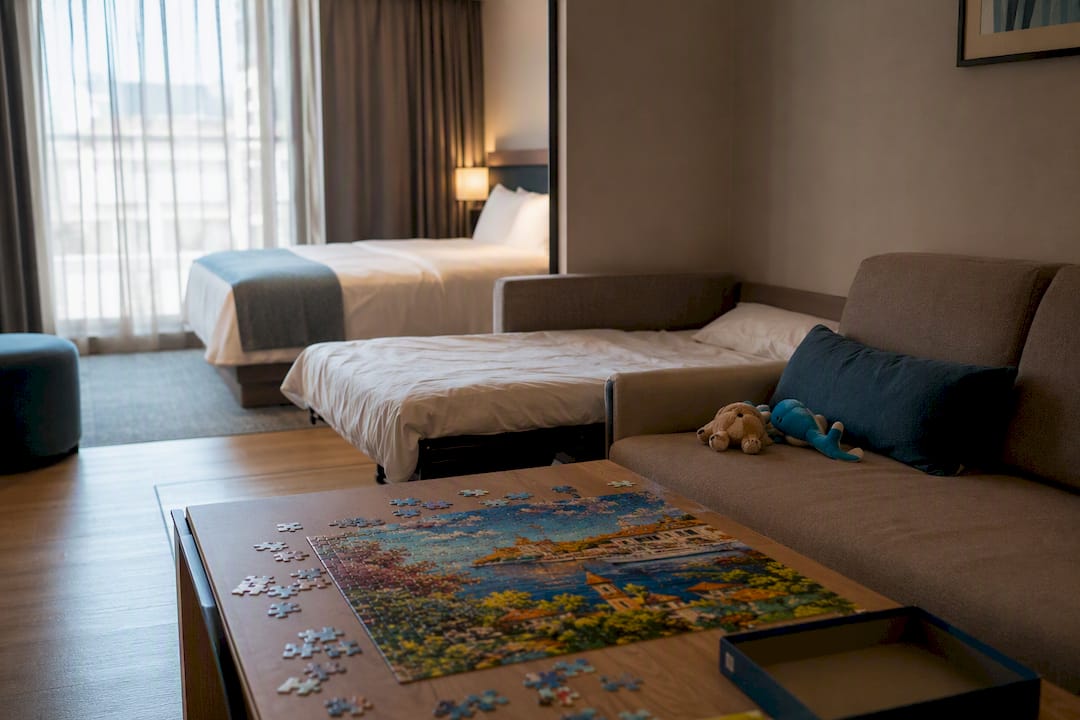
Your choice comes down to five factors: how many people and what ages, how much privacy everyone actually needs, how many nights you're staying, whose morning routine will collide with whose, and what you're willing to spend.
Brand shopping helps here more than most families realize. Embassy Suites, Hyatt House, SpringHill Suites, and Residence Inn all build a meaningful share of their inventory around multiroom or apartment-style layouts with kitchenettes and sofa beds, rather than treating them as a rare upgrade tier.
| Room type | Best for | Bed configuration | Money-saving amenities | Guarantee notes |
|---|---|---|---|---|
| Multibedroom suite | Families of 5, mixed ages | Separate bedroom plus sofa bed in living area | Often includes free breakfast | Suite type usually guaranteed at booking |
| Condo/apartment-style | Stays over 4 nights, any family size | 1 to 2 bedrooms plus full kitchen | Full kitchen cuts daily food cost | Layout confirmed at booking in most cases |
| Bunk-bed family room | Families with 2 to 3 kids | Bunk nook plus separate parent bed | Varies by property | Limited availability, book early |
| Two standard rooms | Teens needing privacy, tight budgets | Two queen or king beds per room | Depends on property | No adjacency guarantee without a call |
| Connecting/adjoining rooms | Parents wanting separation with access | Two rooms joined by interior door | Depends on property | Rarely guaranteed at booking |
How to Save Money Without Sacrificing Space
Compare the full total, not the sticker rate. A $180 room with a $45 resort fee and $30 in nightly extra-person charges costs more than a $220 room with no add-ons, and that math only becomes obvious once you add every line item before booking. Extra-person fees commonly run $20 to $50 per additional adult per night, and resort fees stack on top of that per room, not per person.
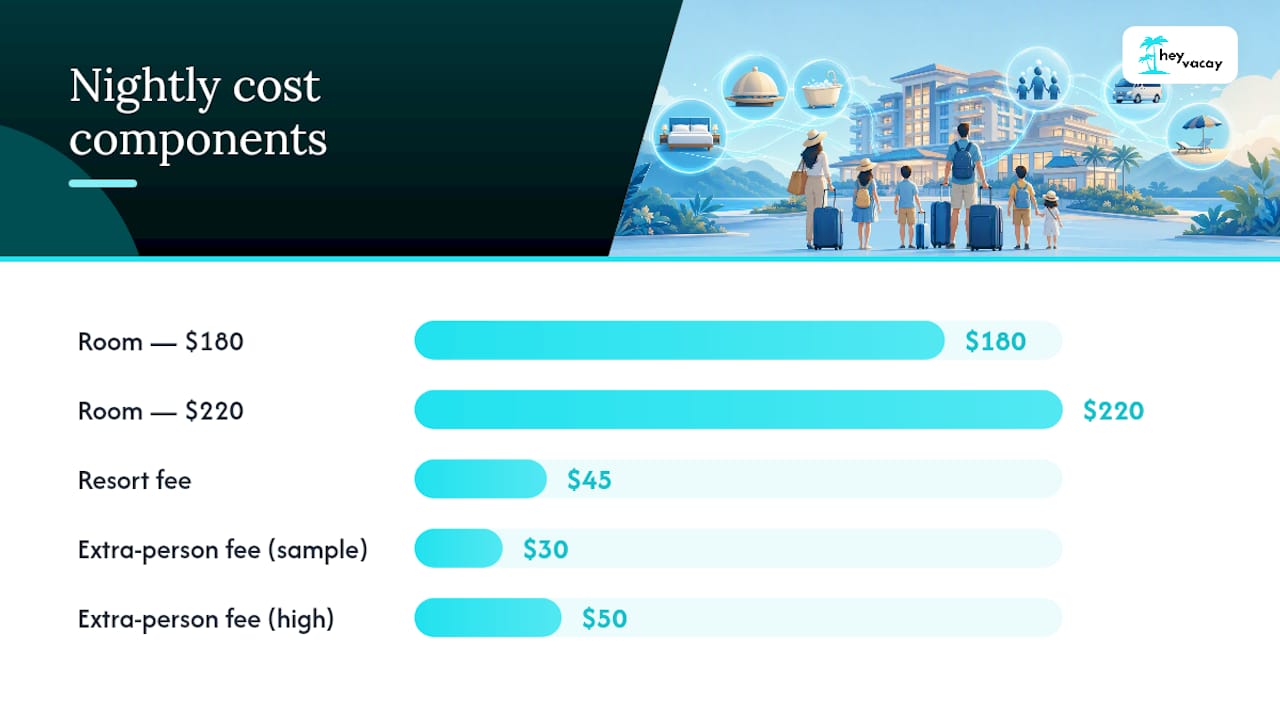
The math shifts more than people expect. Two standard rooms often beat one suite on pure sticker price. But once you add a second set of taxes, a second resort fee, and the cost of eating out for every meal, a single suite or condo with a kitchenette frequently closes the gap or wins outright, especially when the kitchen replaces two or three restaurant meals a day.
A few tactics compound well together:
- Ask about loyalty program suite certificates before assuming you have to pay for an upgrade; Marriott, Hyatt, and IHG all run upgrade programs that can confirm a larger room subject to availability.
- Check whether a credit card tied to the hotel brand includes free breakfast or automatic room upgrades for cardholders.
- Ask reservations directly about family packages, which sometimes bundle breakfast or parking that isn't shown on the standard rate page.
- Book a refundable rate and keep watching the price after you book, then rebook if a lower total appears before the cancellation deadline.
Extra-person fees and resort fees are the two line items families miss most often, and they can add $50 or more per night once you count both.
Your Family Hotel Booking Timeline and Checklist
Timing changes both price and availability. Family-sized layouts are limited inventory at every property, and they sell out before standard doubles do.
- Three to six months out: Start searching if you're traveling during school holidays or peak summer weeks. Booking this early gives you first pick of suites, connecting rooms, and bunk-bed setups before they disappear.
- When you find a good option: Lock in a refundable rate immediately rather than waiting to compare more properties. You can always cancel later; you can't always get the room back.
- Two to four weeks out: Recheck prices on your locked reservation. If the rate dropped, rebook the lower price and cancel the original.
- One week out: Call the hotel to confirm your reservation details match what you booked, including bed count and any special requests.
- Day before or day of arrival: Confirm check-in time, ask about early check-in if your room type is ready, and verify parking or resort fees one last time.
Before you book, settle three things: exact sleeper count by age, your nonnegotiables (kitchen, specific bedding, location near the pool or elevator), and your fee tolerance. At the moment of booking, verify stated occupancy, crib or rollaway fees, whether breakfast covers kids, parking and resort fees, and the cancellation window. Save a screenshot of all of it, plus your confirmation email, in one folder before you close the tab.
Getting Connecting Rooms or a Multi-Bedroom Suite
Book your rooms online first, then call the property directly. Ask for the reservations desk, not the general front desk line, and request connecting rooms by name. Ask three things: whether connecting rooms are available for your dates, whether they can note the request on your reservation, and whether the request is guaranteed or just noted as a preference.
Guarantees vary by brand and even by property; some hotels confirm connecting rooms at the time of booking, but most only add a note that staff will try to honor. If a hard guarantee isn't offered, ask for early check-in instead, since arriving before other guests improves your odds of getting the exact layout.
- Get the agent's name and a confirmation number for the specific request.
- Ask them to email written confirmation if the system allows it.
- If connecting rooms fail to come through, request adjacent rooms on the same floor as a fallback.
Pro Tip: If the room you get on arrival doesn't match what the reservations agent promised, ask for a manager immediately and reference the confirmation number from your call. Hotels resolve mismatches far faster when you can point to a specific promise rather than a general complaint.
Special Situations: Teens, Multiple Families, and Last-Minute Trips
Teenagers often want distance from younger siblings, so two rooms or a suite with a separated sleeping area beats a single open room. Traveling with another family or extended relatives usually means multiple rooms; call ahead and ask for a group rate or block booking, and always request adjacency even if connecting rooms aren't available.
Accessibility needs should never be assumed from a listing. Confirm room layout, roll-in showers, and elevator or ground-floor placement in writing before you travel. Traveling with pets adds its own fee, typically charged per stay rather than per night, so ask upfront.
For last-minute bookings, widen your search radius, stay flexible on exact dates if possible, and call properties directly. Same-day phone calls sometimes surface rooms that never make it into online inventory.
What Booking Platforms Get Wrong About Family Rooms
Most booking sites treat "family room" as a marketing label rather than a real filter. You end up clicking into ten listings to find one that actually states bed count, kitchenette availability, and whether connecting rooms exist. A platform that consolidates those filters into one search, bed count, kitchenette, crib availability, connecting-room requests, saves real time and prevents the classic mistake of booking a room that "sleeps 4" on paper but has one queen bed and a love seat.
Picture a family of six searching for two nights near a theme park. Without clear filters, they book what looks like a suite, only to find at check-in it's one room with a foldout couch and a $40 nightly resort fee that never showed up in the search results.
Fee transparency at the search stage, not the checkout stage, is what actually prevents that kind of arrival-day surprise.
Pro Tip: Before paying for any room, confirm the platform shows your total price with taxes and mandatory fees included, and check that the room's stated occupancy and bed configuration are listed, not just implied by the room name.
What We've Learned Booking for Large Families
The biggest mistake we see: parents book from a single photo without checking the stated occupancy or bed count, then arrive to find the room doesn't fit their family. The second biggest: comparing nightly rates while ignoring resort fees and extra-person charges that only show up at checkout. Fix both by reading the fine print before you pay and calling the hotel once you do.
Book the Right Room the First Time With HeyVacay
HeyVacay is built around the exact problem this guide walks through: matching family-sized rooms to family-sized bookings without the fee surprises. Instead of clicking through ten listings hoping one mentions a kitchenette or connecting-room option, HeyVacay's search surfaces bed counts, room layouts, and total pricing upfront, so the price you see is the price you pay at checkout.
That matters most for larger families juggling multiple rooms or a suite across several nights, where a single missed fee can throw off a whole trip's budget. Every listing shows the full total, including taxes and mandatory charges, before you commit. Plans change, too, especially with kids involved, so look for refundable options when you search for your next stay on HeyVacay and lock in a room that actually fits your family before availability tightens up.
Sources
- Tips for booking hotel rooms for large families - The Points Guy
- Family Hotel Booking: How to Find the Right Room Without Overpaying | Rate Ranger
- Complete Family Hotel Booking Guide: Expert Tips for Stress-Free Travel - Travelansa