

The best Hopper alternatives right now are Google Flights (most travelers' first stop), Skyscanner (flexible-date and open-destination search), Kayak (power users who want everything in one place), Going (deal hunters who want mistake fares delivered to their inbox), Kiwi.com (multi-city and creative routing), and HeyVacay (the hotel-first pick when Hopper's accommodation fees are the real problem). An empirical test of 11 apps and 14 booked flights found that tracking prices on Hopper but booking through a fee-free search engine consistently saved money — which tells you everything about where Hopper's value actually lives.
Quick "best for" labels:
- Google Flights: Best for most travelers — free, fast, no booking fees
- Skyscanner: Best for open-jaw, flexible-date, and "fly anywhere" searches
- Kayak: Best for power users who want price history, hacker fares, and hotel/car bundles in one tab
- Momondo: Best for finding the absolute lowest published fare across a wide carrier mix
- Kiwi.com: Best for multi-city trips and creative virtual-interlining routes
- Skiplagged: Best for one-way domestic travelers willing to accept hidden-city risks
- Going (formerly Scott's Cheap Flights): Best for deal hunters who want mistake fares pushed to them
- Expedia / Booking.com: Best for bundling flights, hotels, and cars under one booking
- HeyVacay: Best when transparent hotel pricing matters more than flight prediction tools
Table of Contents
- Which Hopper alternative fits your travel style?
- Detailed look at each alternative: what it does and who it's for
- How to choose the right Hopper alternative for your trip
- When Hopper is still the better choice
- Final recommendation: which alternatives to try first
- Key Takeaways
- What the flight-app market gets wrong about "best"
- HeyVacay handles hotel pricing the way flights apps should handle fares
- Useful sources and tools
Which Hopper alternative fits your travel style?
The table below maps the dimensions that actually affect your final cost and experience.
| Dimension | What to look for |
|---|---|
| Price tracking / alerts | Real-time fare alerts vs. ML-based price prediction |
| Fees at checkout | Service fees added after fare display vs. fee-free redirect |
| Coverage | Carrier breadth, LCCs included, multi-city support |
| Platform | Mobile app quality vs. desktop-first experience |
| Extras | Hotel/car bundling, package discounts |
| Support & refunds | Contact options available, clear cancellation policy |
How each alternative maps to those dimensions:
- Google Flights — redirects to airline or OTA checkout with no added service fee; price tracking via email alerts is free and accurate. Desktop experience is excellent; the mobile app is solid but less feature-rich than the web version.
- Skyscanner — adds no booking fee and sends fare alerts; its "Everywhere" destination feature is genuinely useful for open-destination travelers. Refund handling depends entirely on the carrier or OTA you book through.
- Kiwi.com — builds virtual-interlining itineraries that no single airline sells, which can cut costs on complex routes. It charges a booking fee and its own refund policy applies — not the airline's — so read the fine print.
Pro Tip: Set fare alerts on Google Flights or Skyscanner for price discovery, then run a final checkout comparison on the airline's own site before paying. You get the alert accuracy of a dedicated tracker without paying a service fee at booking.
Detailed look at each alternative: what it does and who it's for
Skyscanner
Skyscanner's "Everywhere" destination search is the feature that sets it apart. Type your departure city, leave the destination blank, and it returns a map of fares sorted by price. Fare alerts are free and reasonably accurate. No booking fee is added by Skyscanner itself. The Product Hunt alternatives list consistently surfaces Skyscanner as one of the most-recommended Hopper substitutes.
- Refund/support: — Varies by booking partner
Momondo
Momondo pulls from a wide carrier mix and often surfaces fares that larger aggregators miss, particularly on international routes with regional carriers. Its interface is clean and the price calendar works well. Comparably's competitive benchmarking places Momondo among Hopper's closest metasearch peers.
- Fees: — None from Momondo; check the booking partner
Kiwi.com
Kiwi.com builds itineraries by combining flights from airlines that don't interline — a tactic called virtual interlining. This can produce significant savings on routes where no single carrier offers a competitive through-fare. The trade-off is real: Kiwi.com charges a booking fee and issues its own ticket, meaning if one leg is delayed and you miss the connection, the airline is not responsible for rebooking you. Kiwi.com's own guarantee covers some disruptions, but read the policy carefully before booking a tight connection.
- Main downside: — Booking fee plus limited airline-level protection on missed connections
- Refund/support: — Kiwi.com's own guarantee, not the airline's
Pro Tip: On any Kiwi.com itinerary, add at least 3 hours between virtual-interlining legs. The savings evaporate fast if you miss a connection and need to buy a last-minute replacement fare.
Skiplagged
Skiplagged finds "hidden-city" fares — itineraries where the layover city is actually your destination, and the through-fare is cheaper than flying direct. It works, but only under specific conditions: one-way travel, carry-on luggage only (checked bags go to the final destination), and ideally not on your frequent-flyer account. Airlines have pursued legal action against Skiplagged and have penalized loyalty accounts caught using it repeatedly.
- Fees: — No booking fee from Skiplagged; you book directly with the airline
Going (formerly Scott's Cheap Flights)
Going doesn't search fares on demand. Instead, it monitors airline pricing systems and pushes alerts when mistake fares or deeply discounted deals appear. The free tier covers domestic deals; the Premium plan unlocks international alerts and mistake fares. RatePunk's roundup of Hopper alternatives highlights deal-alert services like Going as the best complement to a standard metasearch tool, because they catch pricing errors that algorithms don't surface in real-time searches.
- Refund/support: — You book directly with the airline; Going provides no booking support
Expedia and Booking.com
Both are full-service OTAs that let you bundle flights, hotels, and cars in a single checkout. Expedia's rewards program (One Key) lets points earned on hotels offset flight costs. Booking.com's hotel inventory is particularly deep in Europe. The bundling discount can be real, but always compare the bundle total against booking each piece separately — the math doesn't always favor the package. CB Insights notes that OTAs like these occupy a different market position than metasearch engines, offering more inventory control but also more fee complexity.
- Best for: — Travelers who want one booking for the whole trip and value loyalty points
How to choose the right Hopper alternative for your trip
The right tool depends on what you're actually trying to solve. Run through this checklist before you commit to any app.
Selection criteria:
- Do you need flexible-date search, or are your dates fixed?
- Is this a simple round-trip or a multi-city itinerary?
- How important is fee transparency at checkout versus getting the lowest headline fare?
- Do you want price prediction (ML-based) or price alerts (notification when a fare drops)?
- Do you need bundled hotel and car, or will you book accommodation separately?
- How much does customer support matter if something goes wrong?
Questions to run against any app in 2–3 minutes:
- Does the price shown in search results match the total at checkout, including all fees?
- Is the fare refundable or changeable, and what does that cost?
- Are fees itemized before you enter payment details?
- Can you reach a live support agent if the booking goes wrong?
- Does the app show the airline's own fare, or is it routing through an OTA that adds a markup?
Red flags to watch for:
- A fare that looks lower than everywhere else but jumps $30–$50 at checkout
- Refund policy buried in a separate terms page with no summary at checkout
- No phone or chat support option visible before you book
- "Book now, details later" flows that don't show the full itinerary before payment
- Kiwi.com virtual-interlining legs with under 2 hours of connection time
When Hopper is still the better choice
Hopper's machine-learning price prediction and fintech add-ons are genuinely useful in specific situations. The app's core differentiation isn't search breadth — it's the prediction layer and the insurance-style products built on top of it.
Stick with Hopper when:
- You want a Price Freeze on a fare you're not ready to buy. Hopper's Price Freeze locks in a fare for a fee while you decide. No metasearch engine offers this.
- You want Cancel for Any Reason coverage baked into the booking flow. Hopper's fintech products bundle this in a way that's faster than buying travel insurance separately.
- You respond well to push notifications. Hopper's mobile-first design and aggressive push alerts work well for travelers who want to be told when to buy rather than actively monitoring fares.
- You're a business traveler with a tight travel window. The Price Freeze is worth its cost when you need to hold a fare while waiting for approval.
The caveat: AskCyborg's analysis of Hopper's prediction model notes that prediction accuracy depends on the ML model staying calibrated to current market conditions. When fares are volatile — post-holiday surges, weather disruptions — the "wait" recommendation can misfire. Use the prediction as one signal, not a guarantee.
Final recommendation: which alternatives to try first
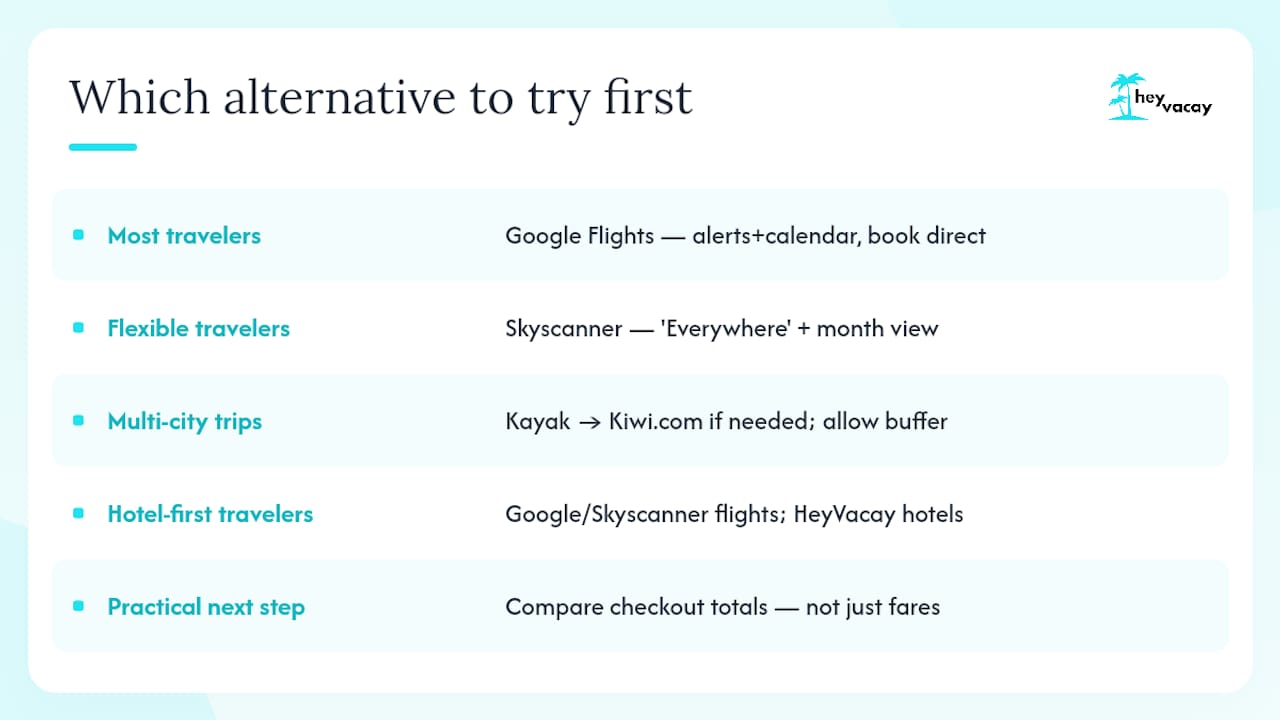
For most travelers (casual planners, round-trip domestic or international): Start with Google Flights. Set a price alert, check the fare calendar for the cheapest travel window, and book directly with the airline when the price looks right.
For flexible or open-destination travelers: Skyscanner's "Everywhere" search and month-view calendar are the fastest way to find where your budget takes you. Pair it with a Going Premium subscription ($49/year) if you can move quickly on a deal.
For multi-city and complex routing: Kayak for initial research and price history, then Kiwi.com if Kayak's results don't produce a workable itinerary. Budget extra connection time on any Kiwi.com virtual-interlining booking.
For hotel-first travelers frustrated by Hopper's accommodation fees: Use Google Flights or Skyscanner for the flight, then handle the hotel separately through HeyVacay. The transparent hotel pricing and AI-driven discovery mean the rate you see is the rate you pay. For last-minute stays, the last-minute hotel deals guide covers timing and app tactics in detail.
Practical next step: Run the same route on Google Flights and one other tool right now. Compare the checkout totals — not just the headline fares — and note whether fees appear before or after you enter payment details. That single check tells you more than any review.
Pro Tip: Use Google Flights or Skyscanner for price discovery and alerts, then book directly on the airline's site. You get the tracking accuracy of a dedicated tool with zero service fees at checkout — the exact workflow the Tripstone 14-flight test validated.
Key Takeaways
Google Flights, Skyscanner, and Going cover the majority of traveler needs better than Hopper alone, while HeyVacay is the strongest hotel-first alternative when transparent accommodation pricing is the priority.
| Point | Details |
|---|---|
| Track on one tool, book on another | Using a tracker for alerts and the airline's site for checkout avoids service fees at booking. |
| Fee transparency is the real differentiator | Always compare checkout totals, not headline fares — hidden fees routinely add $20–$50 per booking. |
| Going fills the gap for deal hunters | The Premium subscription delivers mistake fares that real-time search engines miss. |
| Hopper's fintech features have specific value | Price Freeze and Cancel for Any Reason are worth the cost for business travelers with tight booking windows. |
| HeyVacay for hotel-first travelers | HeyVacay's AI-driven search and no-hidden-fee checkout make it the recommended pick when accommodation pricing is the issue. |
What the flight-app market gets wrong about "best"
Every roundup of Hopper alternatives frames the question as "which app finds the cheapest fare?" That's the wrong question for most travelers. The right question is: "Which app shows me the real price before I commit?"
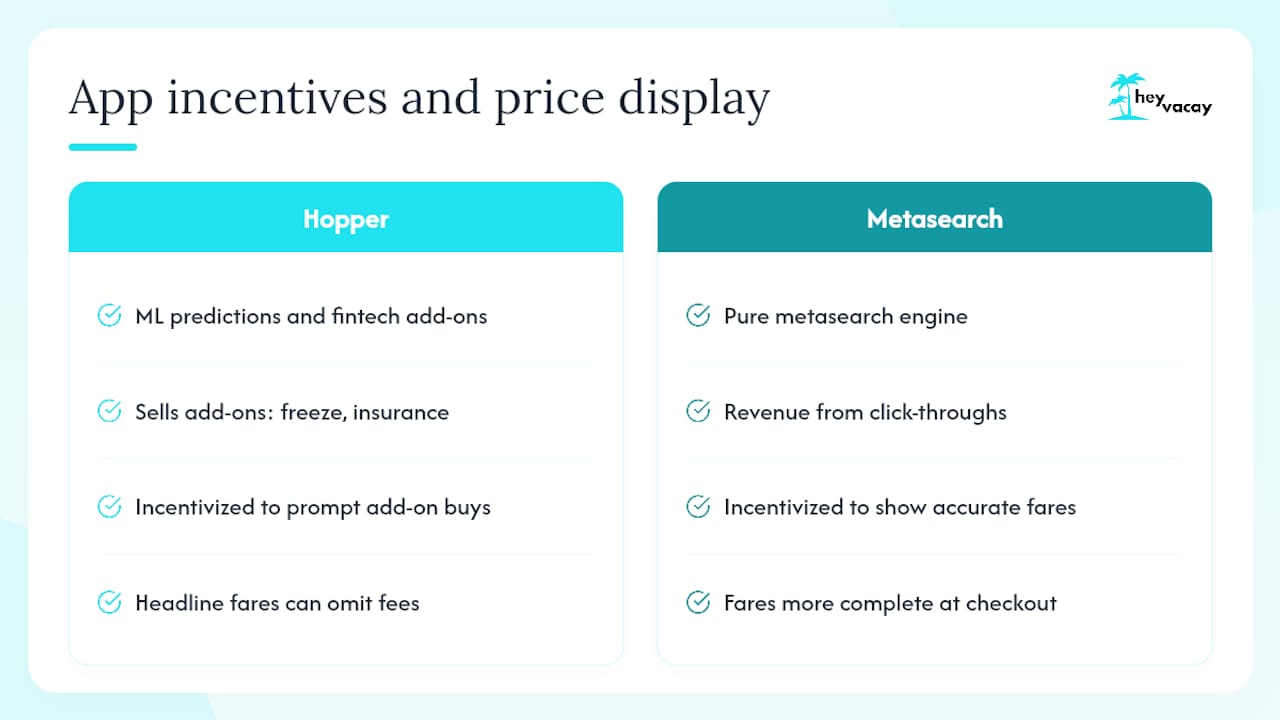
Hopper's prediction model is genuinely clever. Its machine-learning approach and fintech add-ons set it apart from pure metasearch tools. But the business model depends on selling those add-ons — Price Freeze, Cancel for Any Reason, disruption protection — and that creates a subtle tension. The app is incentivized to make you uncertain enough to buy a freeze or insurance product. That's not a criticism; it's just the trade-off you accept when a free app needs to monetize.
Metasearch engines like Google Flights have the opposite incentive structure. Google makes money when you click through to an airline or OTA, so its interest is in showing you accurate, complete fares fast. That alignment is why the Tripstone 14-flight test landed where it did: track on Hopper, book on a fee-free engine.
The travelers who get burned aren't the ones who pick the "wrong" app. They're the ones who compare headline fares without clicking through to checkout. A $189 fare that becomes $229 after fees isn't cheaper than a $199 fare with no fees. Run the checkout comparison every time, on every tool, before you enter your card number. That habit is worth more than any app's prediction algorithm.
HeyVacay handles hotel pricing the way flights apps should handle fares
Most flight-first apps treat hotel search as an afterthought — a bundling feature that generates margin, not a tool built around the traveler's actual experience. Hopper's hotel fees are a known friction point, and the broader OTA landscape is full of rates that look competitive until the resort fee, service charge, or "taxes and fees" line appears at step four of checkout.
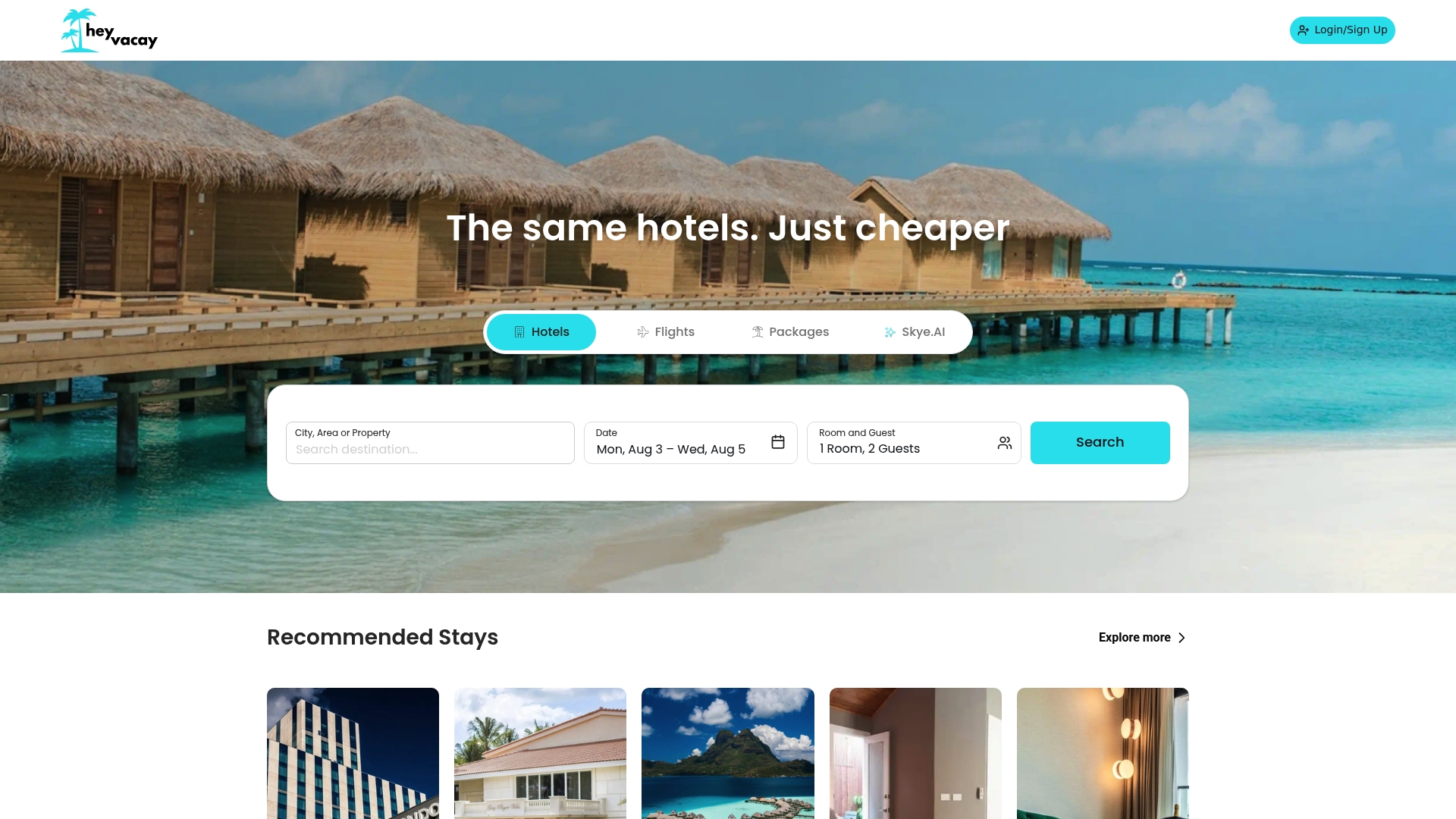
HeyVacay was built to fix exactly that. Its AI-driven hotel search surfaces both budget and luxury options at reduced rates, and the price you see at the start of your search is the price you pay. No service fee added at checkout. No rate that jumps between the results page and the payment screen. Whether you're booking a last-minute city hotel or planning a family trip months out, HeyVacay gives you the same transparency on accommodation that Google Flights gives you on airfare. Use your preferred flight tool to lock in the fare, then search hotels on HeyVacay to complete the trip without the hidden-fee surprise.
Useful sources and tools
The sources below are where the research for this article originated. Each one is worth bookmarking if you want to run your own comparisons or dig deeper into a specific tool.
- 7 Hopper Alternatives That Actually Save You Money (2026)
- Hopper Competitors & Alternatives (Product Hunt)
- Hopper Competitors 2026: Market Position & Top Rivals | App Vulture
- Hopper Competitors & Similar Companies | Owler
- Top Hopper Alternatives, Competitors | CB Insights
- Hopper competitors | Comparably
- Best Hopper Alternative to Find Cheap Flights | RatePunk
- Hopper Business Model & Cyborg Score 8/10 (2026) | AskCyborg