

Transparent hotel pricing means the total cost, room rate plus every mandatory fee, shows up before you enter payment details, not after. When it's working, you'll see a single total-price figure near the booking button, plus a plain-language breakdown of what's included. The first check that matters: does the listing state a total price anywhere before checkout, or only a nightly rate that grows once you click "Book"?
TL;DR:
- Travelers should verify that the total price, including mandatory fees, is clearly displayed next to the booking button before entering payment details.
- Listings that only show nightly rates with hidden or collapsible fee details are not transparent and can lead to unexpected charges.
- Confirm the final total at checkout matches the listed total, and avoid booking if the price changes unexpectedly between pages.
- Using platforms that automatically aggregate mandatory fees and display a static total helps prevent surprises and increases booking confidence.
- Calling the property directly to verify incidental charges or fees before payment can further reduce the risk of unexpected expenses.
Table of Contents
- What Does Transparent Hotel Pricing Actually Look Like?
- How Do You Verify the Final Price Before You Pay?
- How Are Booking Platforms Making Pricing More Transparent?
- How Can You Avoid Surprise Charges at Check-In?
- A Note From HeyVacay on Why Pricing Transparency Matters
- You can see total prices on various booking platforms that aim to include mandatory fees in the listing price rather than adding them at checkout.
- Sources
What Does Transparent Hotel Pricing Actually Look Like?
Most travelers can spot a trustworthy listing within a few seconds, once they know what to look for. The strongest signal is a total price sitting right next to the reservation button, not buried three clicks deep. Regulatory guidance in the UK on online booking price transparency puts it plainly: mandatory fees need to appear in static text near the price, not behind a hover tooltip or a collapsed accordion menu that requires extra clicks to open.
Here's what a genuinely clear listing includes:
- A nightly total AND a full-stay total, both visible without scrolling past the booking button
- A line-item list of mandatory charges, resort fees, destination fees, mandatory service charges, each labeled by name and amount
- Currency shown clearly, with a conversion note if you're booking in a currency different from your card's
- A visual marker, like a "total price" badge or a toggle labeled "show total," confirming the number in front of you already includes everything required
That last point matters more than it sounds. A toggle that switches between "nightly rate" and "total price" is a good sign. A page that only shows a nightly rate with a tiny asterisk pointing to fine print at the bottom is not.
The stakes here are real. Travelers name hidden or unexpected fees as their single biggest booking frustration**, according to Fullstory's 2026 travel survey. That's not a minor annoyance. It's the top complaint, ahead of slow websites, confusing cancellation policies, or bad customer service. Platforms that fix this one thing are solving the problem travelers care about most.
How Do You Verify the Final Price Before You Pay?
Checking a listing takes about a minute if you follow the same order every time. Skipping steps is how people end up with a $40 surprise on their card statement two days into a trip.
- Filter by total price first. If the search platform offers a toggle for "total price" or "final price" instead of "nightly rate," use it before you even open a listing.
- Confirm the currency. Make sure the price you're comparing across sites is in the same currency, and check for a conversion disclosure if you're booking from abroad.
- Open the listing and look for a static total. This should sit near the booking button, not inside an expandable section you have to click to reveal.
- Read the fee breakdown line by line. Resort fees, service fees, and mandatory add-ons should each have a name and a dollar amount, not a vague phrase like "additional charges may apply."
- Check the total again at checkout. The number on the payment page should match what you saw on the listing page. If it doesn't, that's your signal to stop.
- Call or message the property directly if anything is unclear. A legitimate hotel will give you an itemized quote over the phone or through chat without hesitation.
Watch for these red flags: a total that changes between the search results page and the checkout page, a fee that only appears after you've entered your card number, or language like "resort amenities fee (varies)" with no actual figure attached.
Pro Tip: Screenshot the total price and fee breakdown the moment you see it. If the number changes later in the flow, you have proof to dispute the charge or request a refund.
Investigative reporting on resort fees reaching $70 a night at some U.S. properties found that federal disclosure rules increased visibility but didn't necessarily shrink the fees themselves. Verifying the total yourself still beats assuming a rule will do it for you.
How Are Booking Platforms Making Pricing More Transparent?
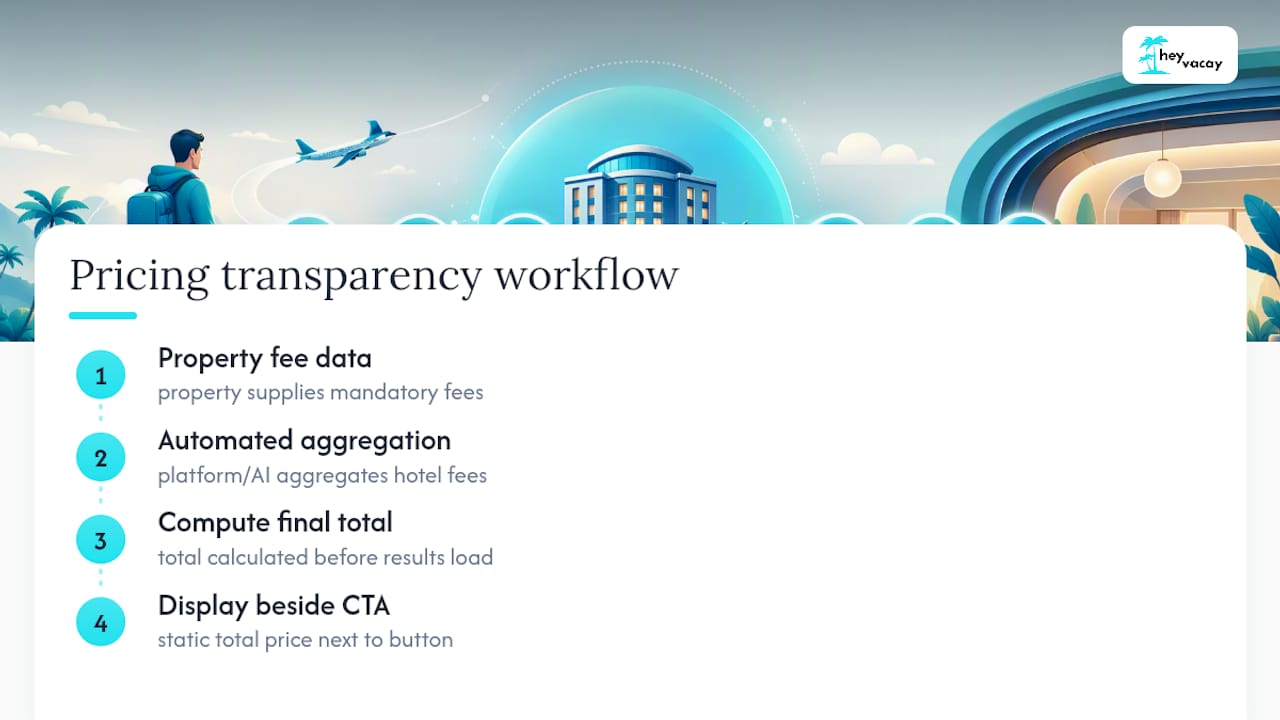
Platforms that do this well rely on a mix of automated fee aggregation and disciplined page design. Behind the scenes, that usually means pulling mandatory-fee data directly from the property and computing one final number before the search results even load, rather than tacking fees on after you've already picked a room. On the front end, it means keeping that total price in static text next to the CTA, exactly the layout the UK's own price transparency guidance recommends.
Travelport's 2026 Traveler Confidence Survey found that clear pricing ranks as travelers' single biggest priority when booking, ahead of loyalty perks or flexible cancellation. That data lines up with what platforms are now building toward: total-price clarity isn't a nice add-on, it's the thing that gets someone from "interested" to "booked."
Some booking platforms use AI to scan hotel rates and aggregate the mandatory costs tied to each listing, aiming to show one accurate total instead of a rate that inflates at checkout. The goal, laid out on the HeyVacay platform, is presenting the same caliber of hotel at a lower, clearly stated rate, with no hidden fees added later in the flow.
That approach extends to how the platform explains pricing mechanics to travelers directly. HeyVacay's guide on dynamic pricing strategies walks through why hotel rates shift by date and demand, so travelers can tell a real discount from a misleading "was $300, now $180" claim that never reflected an actual booking price.
Ranking search results by total price rather than base rate also cuts down on abandoned bookings. When travelers don't have to do fee-detective work themselves, they convert. When they do, a lot of them just leave.
How Can You Avoid Surprise Charges at Check-In?
A few habits, practiced consistently, cut your odds of a surprise charge to almost zero.
- Compare final totals across listings, not nightly rates. A $120 room with a $45 resort fee loses to a $150 room with nothing added.
- Search specifically for parking fees, incidental holds, and resort fees before you pay. These often show up separately from the room rate and get added late in the booking flow.
- Choose platforms or direct-booking flows that hand you an itemized receipt, not just a lump total.
- Set up price alerts or saved searches so you can track how a total price moves over several days instead of booking on the first number you see.
- Read the cancellation and incidental-fee language closely. Vague phrases like "fees may apply at check-in" are a warning sign, not fine print you can skip.
Pro Tip: Call the hotel's front desk directly and ask, "What's the total I'll pay at check-in beyond my reservation?" Front desk staff will usually tell you exactly what a booking page won't.
Parking and incidental holds are especially easy to miss because they're often disclosed at the very end of a booking flow, sometimes only after you've already entered your card. Treat any fee revealed at that stage as a reason to double-check the listing again next time.
A Note From HeyVacay on Why Pricing Transparency Matters
We built HeyVacay around a simple frustration: booking a hotel shouldn't feel like defusing a hidden fee at checkout. Every listing is designed to show a clear total before you commit, because that's the number that actually determines whether a deal is good. If you want the mechanics behind how rates shift, our guide to dynamic pricing breaks down why the same room can cost different amounts on different days, and how to use that to your advantage instead of getting caught off guard by it.
— HeyVacay
You can see total prices on various booking platforms that aim to include mandatory fees in the listing price rather than adding them at checkout.

Try it the way we'd want you to: pull up a hotel you're already considering, check the total on HeyVacay, then compare it against whatever site you were about to book through. If a mandatory fee is unclear or you want an itemized breakdown before you pay, our support team will walk through it with you directly. Search your next stay on HeyVacay and see the full price before you enter a card number, not after.